
Access Control Systems
Manage access to your workplace with a system planned around your doors, users and daily operations. CablingHub helps Toronto and GTA businesses choose and install practical access control solutions.
- Serving Toronto and the GTA since 1995
- Projects planned around your business
- Clear scope and handover information
Access Control Systems for Toronto Businesses
Give the right people access without adding work to your day
Who still has a key to your building? Can a former employee enter after hours? Does your receptionist have to stop work every time a visitor arrives? These everyday questions become harder to manage as your business grows.
CablingHub provides commercial access control system installation for small and medium-sized businesses in Toronto and the GTA. We help you plan entry permissions, connect doors and choose a setup your team can manage with confidence.
Whether you need to control one office entrance or several doors across a facility, start with your business needs. Request a free quote and tell us which areas you want to protect, who needs access and what is causing problems today.

What is an access control system?
An access control system manages who can enter a building, room or secured area. Instead of relying only on physical keys, it uses credentials such as cards, fobs or supported mobile credentials, together with readers, door controllers, locking hardware and management software.
When someone presents a credential, the system checks its permissions before allowing entry. Depending on the platform, you can set access by person, group, door and schedule. Supported systems can also record access events to help an authorized administrator review activity.
For your business, the benefit is practical: staff can reach the spaces they need, while sensitive areas have clearer entry rules. The system should make daily access easier to manage and support safe exit arrangements.
When managing doors starts taking time away from your business
Lost keys create more work and uncertainty
A missing key leaves you wondering who could use it and whether locks need replacing. Electronic credentials can be disabled in a supported system without changing every physical lock. Clear procedures for reporting lost cards and issuing replacements help your team respond quickly.
Staff changes leave old access in place
Hiring, departures and changing roles can make access permissions difficult to track. A planned system lets an administrator assign access based on a person’s responsibilities and remove it when those responsibilities end. That is easier to manage than relying on an informal list of key holders.
Shared entrances expose private work areas
Customers, delivery drivers and contractors may need to enter your premises without reaching stock rooms, IT spaces or staff-only areas. Separating public and restricted access helps your team manage these different needs. Door placement and visitor procedures matter as much as the reader you choose.
Different shifts need different entry rules
Giving every user the same access can create unnecessary exposure outside working hours. Supported schedules let you define when particular groups can use selected doors. We discuss your opening hours, cleaners, contractors and shift patterns so the proposed rules reflect how your business operates.
Commercial access control services built around your doors
CablingHub plans and installs access control solutions for business premises. The scope starts with the doors, people and working routines involved. Available credentials, alerts and software features depend on the chosen system and are confirmed before installation.
Access control planning and system design
We review the entrances and internal areas you want to control, the number of users and who will administer the system. A small office may need a straightforward entrance solution. A larger facility may need access groups, different schedules and several controlled zones.
The plan also considers existing doors, hardware, cable routes and room for future expansion. You receive a clearer basis for choosing equipment and approving the work.
Door access control installation
Readers and electronic locks need to work together with the door itself. We assess the proposed installation, including the door condition, compatible hardware, power and control connections. A poorly closing door can undermine an otherwise well-planned system.
Entry control must also support the required exit operation. Building-specific requirements and any coordination with the landlord or relevant door and life-safety specialists are discussed during planning.
Card and key fob access systems
Cards and fobs give individual users a practical way to enter approved areas. Supported administration tools allow credentials to be issued, assigned to access groups and disabled when they are lost or no longer needed.
We help you consider reader and credential compatibility before buying replacements or expanding an existing system. A sensible credential plan avoids confusion between different card types and reduces dependence on shared access.
Mobile credentials and keypad options
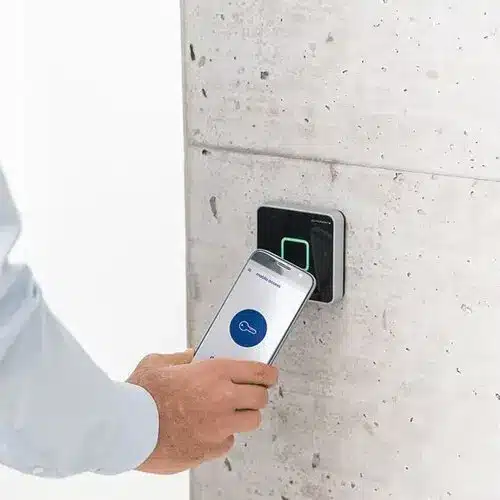
Some systems support entry using compatible smartphones or PINs. These options can be useful where your team wants an alternative to carrying a separate fob, but availability depends on the readers, software and licences selected.
We discuss supported options alongside your users’ needs. Mobile access may involve device requirements or ongoing fees, while shared PINs need careful management. The choice should fit your operations and budget.
Multi-door and multi-location access
Growing businesses often need more than a single controlled entrance. We can plan access across multiple doors and discuss compatible systems that bring selected buildings into a shared management arrangement.
The design considers controller capacity, network connections, administrator permissions and each location’s access needs. Share all proposed sites early so compatibility and management requirements can be reviewed before the rollout.
Access groups, schedules and visitor arrangements
Your employees, cleaners and contractors may need different access to the same premises. Supported group and schedule features help organize these permissions without treating every user as a separate manual exception.
Visitor arrangements can involve reception procedures or temporary credentials where supported. We discuss how access is granted, when it should end and who is responsible for reviewing it, so the technology supports a clear business process.
Cabling and supported security integration
Door controllers, readers and management equipment need suitable connections and power. CablingHub brings commercial cabling experience to the installation, with cable routes and network requirements considered alongside the security equipment.
If you want access events linked with security cameras or other building systems, ask us to review compatibility. Integration depends on the selected products and agreed scope; it should be confirmed before equipment is ordered.
System upgrades, maintenance and user guidance
An older access system may be difficult to expand, unreliable at particular doors or unclear to administer. We assess the existing setup before discussing replacement hardware, compatible upgrades or a wider installation.
CablingHub also provides access control maintenance and instructions for using the installed system. Discuss the support scope, planned checks and administrator responsibilities so your team knows how to manage access after handover.
Choose access control that fits your business and budget
Start with the problem you need to solve. Replacing every door component may be unnecessary if the main issue is a failed reader or a small expansion. A new premises with several restricted areas may need a more complete design.
Compare the full setup rather than the price of a reader alone. Credentials, controllers, locking hardware, power supplies, installation, software and ongoing licences can all affect the decision. Existing equipment may be reusable, but compatibility needs to be checked.
Plan for the people who will manage it
Think about who will add users, remove access and review events. For an SMB without a dedicated security team, clear administration is especially valuable. Tell us about your expected growth and the level of day-to-day management your team can support.
A clear process from site assessment to handover
01
Discuss your priorities
Tell us which entrances or rooms you want to control and what is not working today. Share your approximate number of doors, users and locations, plus any move or renovation deadlines. A floor plan and photos can help us understand the starting point.
02
Review doors, hardware and connections
We assess the proposed door locations, existing locks, reader positions, cable access and power requirements. Where needed, the plan identifies coordination with your landlord, IT provider or other specialists. Reviewing these details early helps avoid unexpected work during installation.
03
Agree on the scope and quote
The proposal should explain the equipment, controlled doors, credential options and configuration work included. Discuss software fees, maintenance, testing, documentation and any work outside the scope. Clear information helps you compare the installation and its ongoing costs.
04
Plan access during installation
Your business still needs to welcome staff and customers while work takes place. We discuss scheduling, temporary access arrangements and any planned interruptions. For busy premises, ask about staged installation so your team can prepare for each affected area.
05
Install, configure and test
The agreed hardware and cabling are installed, and supported access rules are configured. Testing checks authorized and denied entry, selected schedules and the required door operation. Relevant power, network and exit scenarios are reviewed as part of the agreed commissioning scope.
06
Hand over a system your team understands
We explain how to carry out the agreed administration tasks, such as issuing credentials and removing users. Review the installed doors, access groups and support arrangements before the project closes. Your team should know who owns the system and who to contact for help.
Access control for the way your business works
An office may need a controlled entrance and separate access to a server room. A warehouse may need different permissions for office staff and operations teams. A retail business may want public entry during opening hours while keeping stock and staff areas restricted.
CablingHub works with businesses and institutions across commercial, industrial, healthcare and education settings. Each premises has its own door conditions, operating hours and responsibilities. We discuss these details rather than assuming that one setup suits every building.
If your business has an IT provider, facilities manager or property manager, involve them early. Their input helps clarify network access, building approvals and who will manage the finished system.
Why work with CablingHub
Commercial cabling and door access together
Access control depends on more than a reader at the entrance. CablingHub’s commercial cabling and security installation services help bring the door connections and supporting infrastructure into one practical discussion.
A plan based on your daily routines
We start with your doors, users and operating hours. That helps identify where different permissions or schedules are useful and where a simpler setup may be enough. Your business goals guide the scope.
Clear guidance for your administrators
A system is easier to use when the people managing it understand their responsibilities. We provide instructions for the installed access control setup and discuss the tasks your team will handle after handover.
Support for related business systems
CablingHub is a division of Synergy IT Solutions. If your project also involves networking, security cameras or business communications, raise those requirements during planning so the supporting connections can be considered together.
What affects access control installation costs?
Access control installation costs depend on the number of doors, existing door hardware, reader and credential choices, cable routes and management software. Power supplies, compatible integrations and building-specific requirements can also change the scope.
A simple entrance installation and a multi-door facility are different projects. To request a useful estimate, share your business address, door count, user count and preferred completion date. Tell us about existing access equipment and any restrictions on installation hours.
CablingHub offers free estimates, with a site survey where needed before fixed costs are provided. Ask for the installation costs and any ongoing software, credential or support charges to be explained together. That gives you a clearer view of the investment.

Access control installation in Toronto and the GTA
CablingHub provides commercial access control services in Toronto and surrounding GTA communities, including Mississauga, Brampton, Vaughan, Markham, Ajax and Milton. Contact us with your project address and the doors you need to control.
For businesses with several locations, share the requirements for each premises. We can discuss the installation scope, compatible management options and coordination needed across the project. Confirm service availability and scheduling for your locations when requesting a quote.
Frequently asked questions about business access control
Take the next step towards easier, better-managed access
You do not need to choose every reader or lock before speaking with us. Start with the doors that cause problems, the areas you want to protect and the way your team works. CablingHub can help turn those requirements into an installation plan.
Request a free access control quote or call (416) 273-7615. Tell us about your business location and what you need to achieve, and we will discuss the next step.



Other Physical Security and Communication Systems

CCTV Installation

Business Paging Systems

Business Phone Solutions

Security Alarm System
Access control and intercom brands we install and support
Control entry with a system your business can manage. CablingHub installs and supports the following access control and commercial intercom brands, with door hardware, credentials and user access planned around your premises.
Access control panels, readers and credentials: Kantech (Johnson Controls), Keyscan (dormakaba), HID Global, ICT Protege, CDVI, Brivo, SALTO, Ubiquiti UniFi Access.
Commercial video intercoms: Aiphone, 2N, Mircom.









Looking for Kantech access control in the GTA, a Brivo installation or an upgrade to an existing door system? Share the site location, door count and current equipment so we can recommend the next step.
Discuss your preferred brands and project requirements or call 416-273-7615.